
Looper
Loops that play themselves
Every track loops in time with the beat. Here a drum loop, sampler chops, drum lanes and MIDI lanes play together, then SLOOP TAPE drops the whole looper six semitones.
Tutorial coming soon
 SLoop Deck
Looper DAW for iPad
SLoop Deck is a looper, beat maker and full mixing studio in one iPad app. Record loops, play drums and instruments, run your sound through 37 built-in effect pedals, then arrange, mix and export the finished song.
For iPad. iPhone and Mac versions are coming later.

See it in action
Every clip below is a screen recording of the app itself. Tap a video to pause, or turn on its sound.
Looper
Every track loops in time with the beat. Here a drum loop, sampler chops, drum lanes and MIDI lanes play together, then SLOOP TAPE drops the whole looper six semitones.
Tutorial coming soon
Play · Sampler
Load a sample, chop it into slices and play them from the PLAY pads while the song runs.
Tutorial coming soon
Performance Matrix
Lock the drum rolls to your hi-hat, then hold a roll pad to fire 1/4 down to 1/64 note rolls, triplets included. How high you press sets the velocity, and Repeat, Stutter, Reverse and Tape Stop sit right next to the pads.
Tutorial coming soon
Inline editing
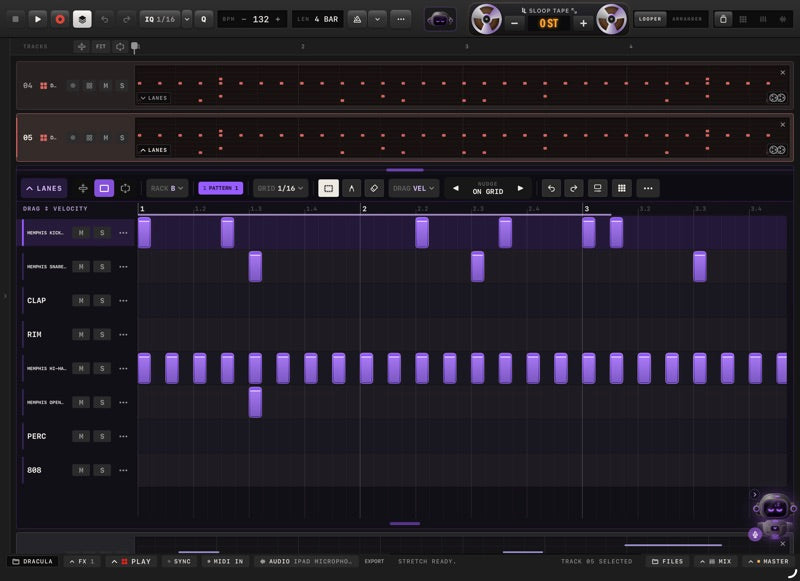
Open a track's lanes under the looper and edit while it plays. Move notes, select a chord and strum it, or draw drum hits and set their velocity, all without leaving the loop.
Tutorial coming soon
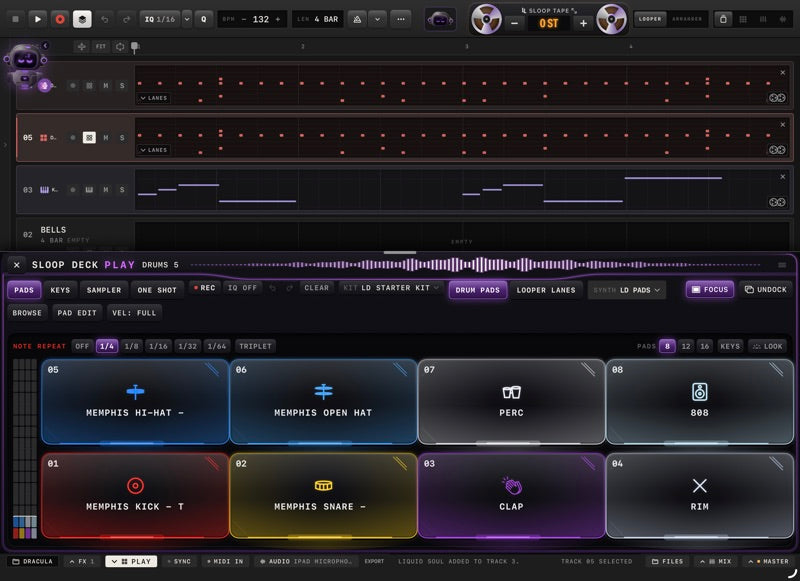
Play · Drums
8, 12 or 16 pads per bank and 64 in all, with note repeat, Key Mode and your own samples on every pad.
Tutorial coming soon
Arranger
Audio and MIDI clips on one timeline. Record onto the song, chop and stretch audio, and watch it play back with the live visualizer.
Tutorial coming soon
Pedalboard
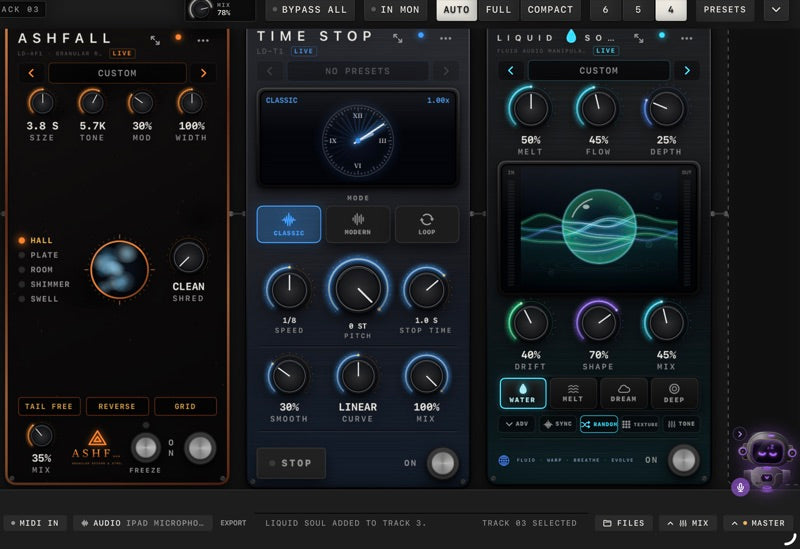
Reverb, time-stop, spectral textures, glitch, tape and more, chained on a pedalboard: 13 included, 24 more in the SIGNATURE FX bundle.
Tutorial coming soon
Screenshot · video coming soon
Mixer
Every channel with its meters, sends, buses and VCA faders. Switch the meters to scrolling waveforms to see what each track is doing.
Tutorial coming soon
Master
Master Drive shapes the tone and drive of the whole mix and measures its loudness live while the song plays.
Tutorial coming soon
Inside the app
Looper
Record loops on up to 24 tracks in time with the beat. Tape Heads turns any track into a four-head tape looper, and the inline MIDI lane lets you fix notes without leaving the loop.
Arranger
Lay your loops out on a timeline, record straight onto the song, chop and stretch audio to tempo, and draw automation for any knob.
Drums
Load your own samples onto 64 pads, play any pad chromatically in Key Mode, add swing, and split a kit out to separate tracks when it's time to mix.
Play
Performance pads with Chord Lab, strum and arpeggio engines play every instrument track. Connect a Bluetooth MIDI keyboard if you'd rather play keys.
Instruments
The VADOR synth comes included with a deep factory library. More premium instruments are available inside the app, and you can load your own AUv3 instruments.
Effects
Delays, reverbs, tape, granular, glitch, saturation and more, all built into SLoop Deck: 13 included, 24 more in the SIGNATURE FX bundle. Chain them on a pedalboard or in the device rack, alongside your own AUv3 effects.
Mixer
Channel strips with EQ and dynamics, sends, buses and VCA faders, plus live waveform meters so you can see your mix as well as hear it.
Master and export
Master Drive and limiters on the master bus, stem separation on your iPad, and export to WAV or MP3 when the track is done.
Vexo
Ask Vexo to turn up channel 8, find your 808s or start recording. Voice commands are recognised on your iPad, and nothing is sent anywhere unless you turn on Vexo's optional cloud chat.
Screenshots
Arranger: audio and MIDI clips with the live visualizer
Mixer with live meters
PLAY › Drum pads
Pedalboard: ASHFALL, TIME STOP and LIQUID SOUL
Inline drum lanes in the looper
Looper with drum and MIDI lanes
TAPE HEADS four-head tape looper
PLAY › Sampler chops
MASTER DRIVE on the master bus
VADOR synth, included
Mixer with DEVICES, PEDALBOARD and EDITOR tabs
Made for musicians
Private
Your recordings and projects stay on your iPad. Read the privacy policy.
Offline
Record, mix and export anywhere. The only optional online feature is Vexo's cloud chat, and it stays off unless you turn it on.
Support
Questions or a bug to report? Visit SLoop Deck support or email sloopdeck@gmail.com.
Built for iPad. iPhone and Mac versions are coming later.
Up next